Wink Lights & Switches
Updated known issues 5/27/2019:
Today I've published my Wink Lights & Switches app to the Samsung store.
Wink Lights is a simple utility for turning on and off smart lights compatible with Wink from your Samsung smart watch. For a full list of compatible light bulbs click here.
Basic Instructions:
After installing the app login using your the e-mail address and password tied to your Wink account.
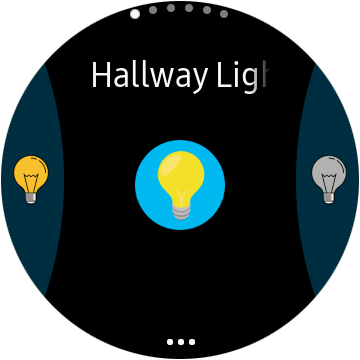
To select a light or switch rotate the bezel on your Gear S3/Galaxy Watch/Gear Sport.
To turn on your light or switch, tap the button on the left.
To turn off your light or switch, tap the button on the right.
Widget:
You can add a widget for each light. Add a widget from the app and then rotate the bezel to select the light or switch that you want. To change the light or switch on a widget just tap on the title of the device.
To add/remove lights or switches:
First make sure the device is added/removed in the Wink app on your phone.
In the Wink Lights app on your watch click the ellipsis on the bottom of the screen. The first option should be "Refresh Lights". This will re-download the devices from your Wink account.
If you have trouble even though you're connected:
If you know that you are connected to the internet and the app refuses to work, try logging out and then logging back in.
In the Wink Lights app click the ellipsis on the bottom on the screen. Rotate your bezel clockwise to select the "Log off" option and then tap "Log off". This will remove your information from the app and close the app.
Then open the app and log back in.
If you have trouble logging in:
If you receive messages that say something other than your e-mail/password is incorrect, or indicate DNS problems, or network issues please contact me at easerlysoftware@gmail.com so that I can troubleshoot the log in process.
Known Issues:
here is a limit of 20 lights/switches and 20 shortcuts.
Shortcuts seem to not work with garage doors. Especially Chamberlain garage doors. This may be a problem with Chamberlain and Wink in general.
If you got here from Google:
You can download this app by visiting this link from your phone (it must be on your phone):
http://apps.samsung.com/gear/appDetail.as?appId=org.easerly.winklights
Future Releases:
Features I plan on adding in this app include :
2. Adding support for changing brightness for dimmable lights.
3. Adding support for changing color for color light bulbs.
If you have any suggestions:
If you have any suggestions about this app or ideas for another app for me to write please e-mail me at easerlysoftware@gmail.com.
Again I really appreciate your interest in my app. It took a while to get it up and running.
Thanks again,
Brian

I can't wait for more updates in this app
ReplyDeleteI really love it
Thanks. I appreciate it. I hope to push out new features soon.
DeleteIs there a limit to the number of lights and shortcuts? Doesn't show all of mine. Also, the lights are ordered alphabetically but the shortcuts aren't. Thanks for the neat little app, found out about it on the Wink users Facebook group.
ReplyDeleteYes. Unfortunately the app should only support up to 20 of each type of object. This is due to limitations in the Tizen interface. I hope I can find a creative way to get around this.
DeleteAs far as sorting, the lights and shortcuts are shown in the order they download from Wink.
Thanks a lot! I am glad you find the app useful.
BTW. How many lights/shortcuts do you have?
Hi Brian, my name is Brian. Live the app however it closes out constantly, can't get through my switches before it closes. Any ideas?
ReplyDeleteThanks for emailing me and providing details. I'm still working on updates and bug fixes for the app.
Delete